Family Hub texts
Family Hub is a private organizer for one household: a shared calendar, chores, lists and meals. Members of that household can choose to get some of it by text message.
What you get
- Event reminders from the family calendar, 1 hour before an event (7 AM for all-day events), for the events you pick or for all events.
- A daily summary if you turn it on: the day's events, dinner, and what's left to do, at a time you choose.
- Answers from FamBot, the hub's assistant, when you reply to one of these texts with a question about the hub.
How you opt in
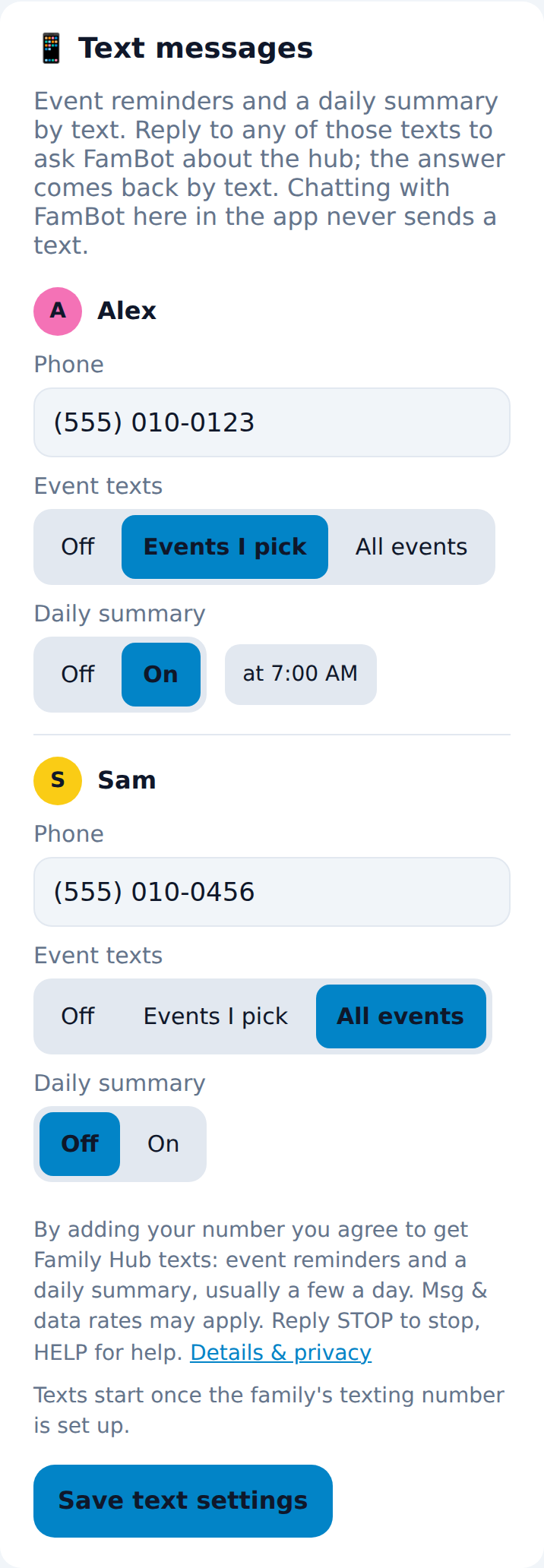
Only members of the household can sign up, from inside the Family Hub app. In Settings ▸ Text messages, a member types in their own mobile number, chooses which texts they want, and taps Save text settings. The screen says, next to the Save button:
“By adding your number you agree to get Family Hub texts: event reminders and a daily summary, usually a few a day. Msg & data rates may apply. Reply STOP to stop, HELP for help.”
Nobody gets a text unless their own number is saved there. Nothing is sent for marketing.
How often
It varies with the family calendar: usually 1 to 5 texts a day per person, plus a reply to each question you text. Message and data rates may apply.
How to stop
Reply STOP to any Family Hub text and you'll get no more texts. Reply HELP for help. You can also clear your number or switch the texts off in Settings ▸ Text messages.
Sample messages
Privacy
- Your mobile number is stored only in the household's private Family Hub database, and it is used only to send you the texts you chose and FamBot's replies.
- We never sell, rent or share mobile numbers with third parties or affiliates for marketing or promotional purposes. Text messaging opt-in data and consent are not shared with any third party.
- Texts are delivered by Twilio, our messaging provider. FamBot's replies are written by an AI model (Anthropic's Claude) from the hub's own data; the question you text is sent to it to write the answer.
Terms
- Program: Family Hub texts. Event reminders, a daily summary, and replies to questions you text, for members of one household.
- Message frequency varies. Message and data rates may apply.
- Reply STOP to cancel at any time and HELP for help.
- Carriers are not liable for delayed or undelivered messages.
Family Hub is a private household app; this page describes its texting program.